Geekpedia Programming Tutorials


Validate using RequiredFieldValidator

In this tutorial you'll find out how to validate a TextBox and RadioButtonList control on a webform using RequiredFieldValidator, which will show a warning and stop the submission of the form if a required field has no value.

On Tuesday, August 10th 2004 at 08:36 AM
By Andrew Pociu (View Profile)
****-   (Rated 3.8 with 55 votes)
Contextual Ads
More ASP.NET Resources
Advertisement
In this tutorial you'll find out how to validate a control on a webform using RequiredFieldValidator. Using this you can show a warning and stop the submission of the form if a required field has no value.


Start a new ASP .NET Web Application project in Visual Studio .NET, named formValidation.

Add a new TextBox, a Button and RequiredFieldValidator:
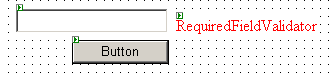


The RequiredFieldValidator validates a field to see if a control has a value or not. In our example we use it to check if the box is empty or not.


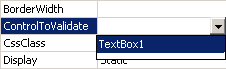
We choose which control we need to check by changing the ControlToValidate property to the name of our TextBox control - TextBox1:


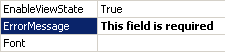
As you can see, you can easily do this in the Properties window of Visual Studio .NET. Also let's change the error message that will be displayed to the string 'This field is required'. We do this by changing the ErrorMessage property:


Try it. Don't enter anything in the TextBox and press the button, or just press anywhere on the page so that the TextBox loses focus. As expected, the message 'This field is required' is displayed in red, next to the TextBox.


Let's look into the HTML source of the webpage in Visual Studio .NET. In the form we can see how the properties (like the ErrorMessage and ControlToValidate are set).


<form id="Form1" method="post" runat="server">

   <asp:TextBox id="TextBox1" style="Z-INDEX: 101; LEFT: 16px; POSITION: absolute; TOP: 16px" runat="server" Width="152px" Height="24px"></asp:TextBox>

   <asp:RequiredFieldValidator id="RequiredFieldValidator1" style="Z-INDEX: 103; LEFT: 176px; POSITION: absolute; TOP: 24px" runat="server" Height="8px" ErrorMessage="This field is required" ControlToValidate="TextBox1"></asp:RequiredFieldValidator>

   <asp:Button id="Button1" style="Z-INDEX: 102; LEFT: 72px; POSITION: absolute; TOP: 48px" runat="server" Width="97px" Text="Button"></asp:Button>

</form>


If you look into the webpage source after it is compiled, you'll see that the field is validated using client-side code written in JavaScript. This happens in Internet Explorer. But if you try the code in Mozilla Firefox, the HTML source is different - the validation is performed server-side, as not all browsers support JavaScript. And to be sure that the form is validated, if the client browser is not Internet Explorer (which supports JavaScript) server-side validation will be used.

So when you submit the form in Mozilla Firefox, if you don't enter any text in the TextBox and you press the button, you'll have to wait for the page to load again and the error to show up.

The InitialValue property


Maybe you want to set a default string for the TextBox like 'Type your name here', but if the user doesn't modify that value and submits the form? The property InitialValue of the RequiredFieldValidator helps you when you want not to validate the form when a specific value is entered - in our case when the 'Type your name here' string is in the TextBox, because that means that the user didn't change the value at all. And I don't believe there's someone who's name is actually 'Type your name here'.

To test this property, first change the Text property of TextBox1 to the string 'Type your name here'. Next change the InitialValue property of the RequiredFieldValidator to the same string. Run the code and see what happens. If you try to submit the form with the default value of the TextBox, it won't validate.


Using RequiredFieldValidator to validate other controls


Perhaps you'll want to validate RadioButton controls, because in a list of RadioButton controls usually none of the controls are selected by default.

Add a RadioButtonList control to the page and add some items using the Items property (from the Properties window). Also add another RequiredFieldValidator. Set the ErrorMessage property to the string 'You must choose an option', and the ControlToValidate property to RadioButtonList1:
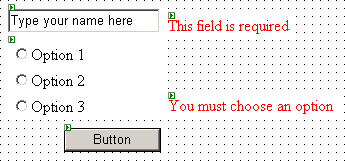


If you don't choose one of the three options, the form will be invalid causing the 'You must choose an option' error to show up.
Digg Digg It!     Del.icio.us Del.icio.us     Reddit Reddit     StumbleUpon StumbleIt     Newsvine Newsvine     Furl Furl     BlinkList BlinkList

Rate Rate this tutorial
Comment Current Comments
by Vicky on Tuesday, October 12th 2004 at 01:42 AM

hello..
I have 2 text box and atleast one of them should be filled in.. Else it should give out error..? can this be done

by Andrei Pociu on Tuesday, October 12th 2004 at 09:02 AM

I don't think you can validate this way using the RequiredFieldValidator. You can always try to validate the textboxes programatically, and it will be fairly easy to do what you wish.

by Chris Holmes on Tuesday, January 25th 2005 at 06:22 PM

What if option 1, 2 or 3 were required ONLY if text were entered into the text field?

by Chris Holmes on Tuesday, January 25th 2005 at 06:24 PM

What if option 1, 2 or 3 were required ONLY if text were entered into the text field?

by Gennaro on Thursday, June 2nd 2005 at 10:27 AM

How can you use this validation using a Calendar, to test whether a user has selected a date?

by aro on Thursday, July 7th 2005 at 10:07 AM

can we stop the execution of RequiredFieldValidator dynamically.

My requirement is this..i have two Buttons.when i press button1,RequiredFieldValidator ha sto work..when i press the second buttton..it should not run...
can we do likr this??....

by aro on Thursday, July 7th 2005 at 10:09 AM

can we stop the execution of RequiredFieldValidator dynamically

My requirement is this..i have two Buttons.when i press button1,RequiredFieldValidator has to run..when i press the second buttton..it should not run...
can we do like this??....anybody can help me??

by Jos on Monday, July 25th 2005 at 05:45 AM

I have a textbox where i type in a number.
Next step is to place dynamically some textboxes and validators (given number) on a screen.
But how can i reset this form without triggering the validator??

by pdaddy on Thursday, August 11th 2005 at 04:11 PM

aro - set the CausesValidation property of the second button to false.

by srikanth on Tuesday, December 27th 2005 at 12:09 PM

hai aro ur case can be done in the button properties there is an option weather the the page as to valid or not in that we can achive ur case

by srikanth on Tuesday, December 27th 2005 at 12:12 PM

hai can any body can show how the mail adress in th text box validation with out using validate controlin asp.net plz give me example using javascript how it can be done tell me plz

by Alameen on Saturday, December 31st 2005 at 02:26 AM

validation of textbox in asp.net. i want to validate only strings(that is alphabets a-z lower and upper should accept in textbox)not numeric values and special characters.......plz help very urgent

by sathya priya on Saturday, January 21st 2006 at 02:00 AM

How to set default values for textbox using javascript

by Grant on Thursday, April 6th 2006 at 02:08 PM

Really crummy move if Firefox pages must still validate server-side. It\'s not like Firefox doesn\'t support javascript, and I could disable javascript in IE, also. ASP.NET should be simply checking to see if javascript is disabled, first. I don\'t think it has anything to do with javascript - that\'s an excuse.

by Vishal on Thursday, August 24th 2006 at 10:09 AM

I know how to use requiredfieldvalidator in ASP.NET. Please send me an example how to use requiredfieldvalidator for a textbox in an html page using javascript. Please send me as early as possible. If possible send it today itself.

by Vishal on Thursday, August 24th 2006 at 10:35 AM

I know to write coding for sending mail in ASP.NET. Please send me how to write coding for sending the mail using javascript in HTML.

by Andrei Pociu on Thursday, August 24th 2006 at 11:05 AM

You can't do that because JavaScript & HTML is client-side and so you can't use an email server. The most you can do is to create form or a link that then prompts the user user to use his email client for sending the email.

by tyrty on Thursday, March 8th 2007 at 01:07 AM

ry

by sathyanarayanan on Friday, April 27th 2007 at 02:45 AM

how to accept only characters in asp.net charactertextbox and accept only numbers in asp.net numbertextbox

by on Tuesday, May 8th 2007 at 06:09 AM

yryrytry

by B.laxmi on Monday, August 6th 2007 at 01:54 AM

send the coding part for accepting only string in the textbox

by baber moosa on Friday, August 31st 2007 at 10:07 PM

how to accept only characters in vb.net charactertextbox and accept only numbers in vb.net numbertextbox

by ahmed elnagar on Friday, September 14th 2007 at 01:29 AM

hi i am using an editor how can i stop textbox validate where i can submit my formatted message as html in my data base

by vishal on Sunday, September 30th 2007 at 05:15 AM

I dont want to validate text boxes on home \"link\" button then what to do please send me the example.i have used required field validator

by on Tuesday, November 13th 2007 at 07:02 AM

b

by prabhakar on Wednesday, January 2nd 2008 at 09:33 PM

hi i want to validate texbox as string, and integer, decimal values how to do that

Expecting ur earlier action

by 3 on Tuesday, January 8th 2008 at 04:43 AM

by ravi kishore on Tuesday, January 22nd 2008 at 05:12 AM

hi,
i your postings are good. i have a textbox in vb.net, i want this textbox can access only numbers

by KMT on Monday, February 11th 2008 at 03:57 PM

ravi - Use an AJAX Masked Edit control

by pradnya on Thursday, April 3rd 2008 at 09:33 AM

i want asp.net with c# code in which textbox can accept only string value using valiadtion control

by Dean on Friday, June 13th 2008 at 10:52 PM

This does not work inside a masterpage since the master page changes the ids of the text boxes to ct100_xxx_textbox and the validator still refers to just textbox. Anyone know how to solve that problem otherwise can't seem to use template master pages with validation in VS 2005

by vineetha on Thursday, July 10th 2008 at 01:59 AM

how can i allow only alphabets in a textbox in asp.net

by Alex on Thursday, October 2nd 2008 at 04:01 AM

@Dean: it should just work om MasterPages as long as they are in the same NamingContainer. The RequiredFieldValidator requires that everything is visible: the textbox AND the validator, and their enclosing containers.

by sadsad on Sunday, November 16th 2008 at 10:38 PM

sadsads

by 234 on Thursday, November 27th 2008 at 01:07 AM

t

by Jay on Sunday, January 4th 2009 at 09:32 PM

<asp:RegularExpressionValidator
id = "validate_reg"
ControlToValidate = "usernsmr"
runat = "server"
Text = "The Username Is not Valid."
CssClass ="error"
Display = "Dynamic"
ValidationExpression="^[a-zA-Z0-9]\w{3,14}$">
</asp:RegularExpressionValidator>


Thid should solve all validation problems....

by Kushal on Wednesday, January 14th 2009 at 02:54 AM

whts the ValidationExpression of the Date


Thnks
Kushal

by Kushal on Wednesday, January 14th 2009 at 02:54 AM

whts the ValidationExpression of the Date(mm/dd/yyyy)

Thnks
Kushal

by john jeyaraj on Tuesday, February 3rd 2009 at 11:37 PM

how can i allow alphabets in textbox and how can i allow email id format in textbox using windows applications

by john jeyaraj on Tuesday, February 3rd 2009 at 11:38 PM

how can i allow alphabets in textbox and how can i allow email id format in textbox using windows applications

by chitra on Wednesday, February 11th 2009 at 04:14 AM

How to write codings for required field validator using Java Script

by jeyaraj on Sunday, February 15th 2009 at 09:53 PM

It was very useful to me. Thank you for your information

by Rubin on Monday, March 30th 2009 at 01:45 AM

It was very useful to me. Thank you for your information

by ramrajnn on Sunday, April 5th 2009 at 05:31 AM

sir,i want to asp.net coding of requires filed validator.

by ramrajnn on Sunday, April 5th 2009 at 05:31 AM

sir,i want to asp.net coding of requires filed validator.

by ramrajnn on Sunday, April 5th 2009 at 05:32 AM

sir,i want to asp.net coding of requires filed validator.

by sandipta on Tuesday, June 23rd 2009 at 07:43 AM

how to validate multiple controls using a single requiresfieldvalidator

by sandipta on Tuesday, June 23rd 2009 at 07:43 AM

how to validate multiple controls using a single requiresfieldvalidator


Comment Comment on this tutorial
Name: Email:
Message:
Comment Related Tutorials
There are no related tutorials.

Comment Related Source Code
There is no related source code.

Jobs ASP.NET Job Search
My skills include:
Enter a City:

Select a State:


Advanced Search >>
Latest Tech Bargains

Advertisement

Free Magazine Subscriptions

Today's Pictures

Today's Video

Other Resources

Latest Download

Latest Icons